Efficient 5-Minute Scalping Strategy Utilizing the Half Trend Indicator
Boost your trading results with the 5-Minute Scalping Strategy — a powerful setup combining the Half Trend and MACD indicators. Optimized for 5M trading, it helps traders achieve accurate entries and consistent profits.

Ready-made EA for this strategy is provided below — scroll to purchase
◊ Introduction to the HalfTrend & MACD Trading Strategy
Scalping is one of the most dynamic and fast-paced trading styles, designed for traders who seek to profit from small market movements within short timeframes. The 5-minute scalping strategy using the Half Trend and MACD indicators offers a structured and efficient way to capture these quick opportunities. By combining the trend-identifying precision of the Half Trend indicator with the momentum confirmation of the MACD, traders can form a reliable system for entering and exiting trades in a disciplined manner. In this article, we will explore how to set up and execute this strategy step by step.

◊ What is the HalfTrend indicator?
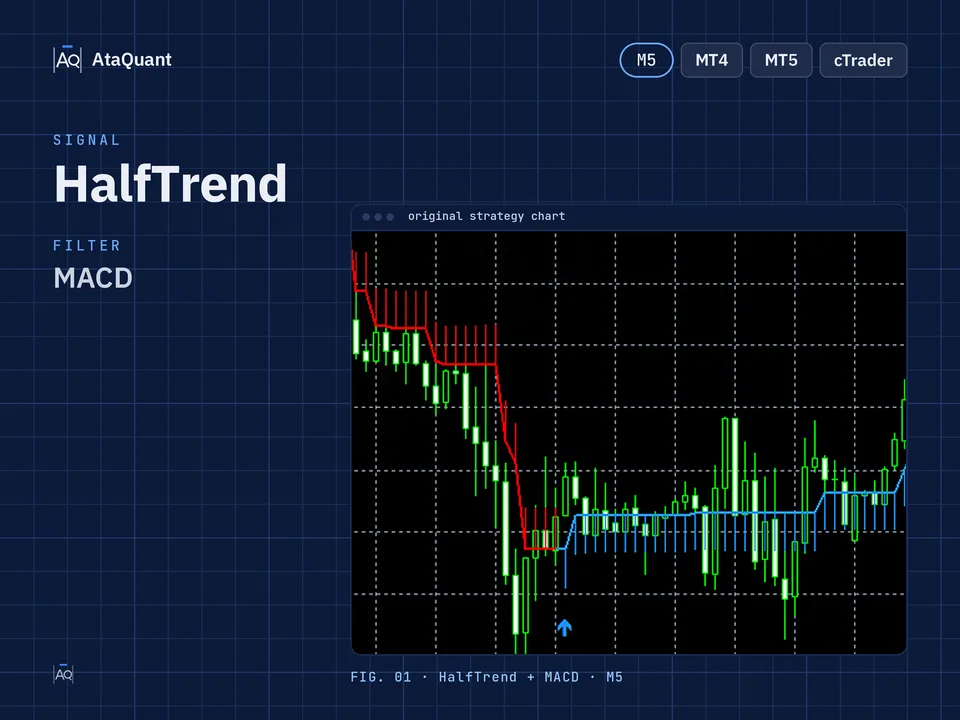
This indicator, similar to the Supertrend indicator, displays the prevailing trend and comprises three lines.
Central line: This line represents the actual trend. The blue color indicates a bullish market sentiment, while the red color signifies a bearish market sentiment.
Upper and lower lines: These lines correspond to ATR High and ATR Low, serving as valuable tools for setting stop-loss levels.
Learn more:
1- A powerful trading strategy utilizing the halftrend, stochastic, and RSI indicators
2- Efficient 5-minute pivot point supertrend scalping strategy
◊ Indicators Used
1- HalfTrend indicator
2- MACD indicator

◊ The trading time frame of this strategy
The recommended time frame for this strategy is 5 minutes.
◊ Inserting indicators in TradingView
Inserting the HalfTrend indicator in TradingView
This indicator can be used in the TradingView environment. To insert it on the chart, from the trading view indicators section, search for the HalfTrend name as shown below and activate it. Make sure that the author of this indicator is everget as shown below.

◊ Settings of indicators
In this strategy, all the settings of the indicators should be the same as the default settings.
Want to Automate this Strategy? Check out Ready-Made Expert Advisor here
◊ Entry and exit rules with this strategy
In this strategy, we enter the trade with the buy or sell signals of the Halftrend indicator and confirm the entry with the MACD oscillator.
In the MACD indicator, the crossovers between the MACD and Signal lines hold significant importance. Specifically, we focus on two types of crosses:
Positive MACD Area: When the MACD line intersects the Signal line from top to bottom, it signals a potential buying opportunity.
Negative MACD Area: Conversely, when the MACD line crosses the Signal line from bottom to top in the negative MACD area, it indicates a potential selling opportunity.
In the following, we teach step-by-step how to buy or sell with this strategy.

◊ How to open a long position for using HalfTrend & MACD Setup
● Entry Rules
To make a long trade, the following conditions must be met:
The first condition - in the MACD indicator, in the part below zero, the MACD line (blue line) must intersect the Signal line (orange line) from the bottom to the top.
The second condition – the Halftrend indicator- issues a buy signal. We wait until the candle signal closes so that the signal stabilizes.
The third condition - after setting the second condition, both MACD and Signal lines should still be in the negative part of MACD (lower than zero).
By establishing all three conditions, we open a long position.
●Exit Rules
Stop Loss is set as the blue points of the Halftrend indicator (ATR LOW).
Target or take profit: the profit of this type of trade is based on the relativity of risk to return to one in low-risk mode and one to two in high-risk mode.

◊ How to open a short position for using HalfTrend & MACD Setup
● Entry Rules
The following conditions must be met to complete a short trade:
The first condition - in the MACD indicator above zero, the MACD line (blue line) must intersect the Signal line (orange line) from top to bottom.
The second condition – the Halftrend indicator, issues a sell signal. We wait until the candle signal closes so that the signal stabilizes.
The third condition - after setting the second condition, both MACD and Signal lines should still be in the positive part of MACD (above zero).
By fulfilling all three conditions, we will open a short position.
●Exit Rules
Stop Loss: We consider the red points of the Halftrend indicator, which is ATR High, as the stop loss.
Target or take profit: the profit of this type of trade is based on the relativity of risk to return to one in low-risk mode and one to two in high-risk mode.

Note: The optimal timeframe for this strategy is 5 minutes.
Conclusion
The 5-minute scalping strategy, using the Half Trend and MACD indicators, is a simple yet effective method for traders aiming to capture quick profits on short timeframes. Its clear entry and exit rules make it suitable even for beginner traders, while its reliance on both trend and momentum confirmation enhances accuracy. However, as with any trading system, consistent results depend on proper risk management and discipline. Testing this strategy under different market conditions and adjusting position sizes carefully can help traders control risk.
Looking for more? Discover our other forex trading strategies and see how they can fit your trading style.
Professional tools for every trader
From custom Expert Advisor development based on your unique ideas to ready-made EAs built on documented strategies – we’ve got you covered. Find the solution that fits your style in our EA Shop.
Visit our Expert Advisor Shop
Check out our Free Indicators here
The EA for this strategy
The rules above, coded as a ready-made Expert Advisor. See its inputs and platforms, or ask for a modification.